Beyond Deep Research
Deep research tools write literature reviews and reports from sources they have chosen. You get text with references, but checking how the answer was reached can be difficult. When you are doing research, you need to understand the literature yourself. You need control over where you look, which papers you include, and what you take from them.
Specialised tools such as Elicit and Consensus give you more control, but you still rely on their method. A desktop agent such as Codex or Claude Code, working with local files and skills, lets you run the process yourself. A skill is a set of instructions for a task, such as organising references or reading a paper. You give up some of the providers' tested presets, and their tools may sometimes do a better job. Services like Elicit can also be used by the agent directly as part of your inquiry.
What does that process look like? Let's follow one question: How are AI-scientist systems actually evaluated — and who checks the claims? These are systems intended to carry out parts of scientific research. We want to understand the evidence for what they can do. The tables and Zotero demonstration use invented paper titles, passages, and decisions. The Elicit example describes saved searches from research on AI-scientist evaluations.
Step 1 — Find and save
At the start, we do not yet know how this literature describes evaluation. Searching only for 'AI scientist' might bring us announcements, system descriptions, and reports of experiments. We need enough of that variety to work out what to look for next.
I would start with several places: Semantic Scholar for research papers, Google Scholar and Google for other papers and related discussions, Elicit for another view of the question, and references in papers I already know. Each gives us a way into the literature. The first task for the agent is to find those sources and keep them together.
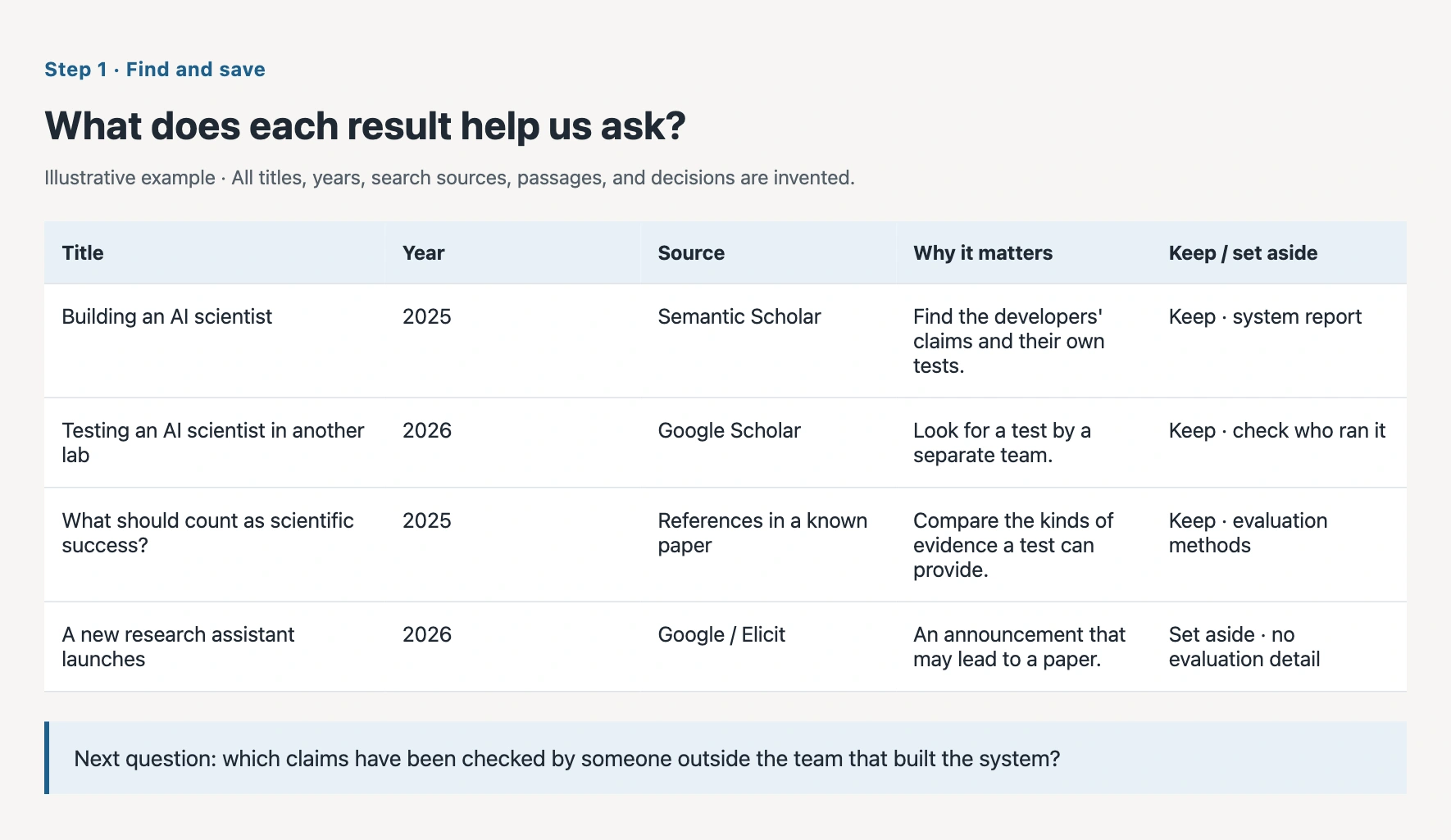
I want to understand how AI-scientist systems are evaluated and who checks their claims. Search Semantic Scholar, Google Scholar or Google, and Elicit. Look in my existing papers too, and follow useful references. Save every result you retrieve and the history of your searches in one project folder. Show me a table with the title, year, where you found it, and why it might help answer the question.
How Elicit’s API was used. An API is a way for the agent to ask Elicit to do a task directly and receive the results. You describe the research question in ordinary language. The agent searches for Elicit’s official guidance, finds its API documentation, and reads how to use it for the search. You do not have to supply those technical instructions.
If API access is needed, the agent asks you to authorise it. It then uses the guidance it found to prepare the searches, sends the research questions through Elicit’s API, and saves the returned paper records alongside results from other sources. Finding the instructions and working out how to use the service are part of the agent’s work. Elicit’s API guide explains the direct access used in this process.
The saved example contains two searches with different purposes. One looks broadly for empirical evaluations and independent checks of AI-scientist systems, including expert or experimental validation. The other looks for evaluations of particular life-science research systems and benchmarks. Both ask for papers from 2025–2026, with up to 25 results per search. Each returned 25 records. The agent saved the search questions and results, then brought the 50 returned rows into one table. Those rows are search results; the same paper can appear in more than one search.
The records include titles, authors, publication years, abstracts where available, and links for finding the papers. That gives us material to compare, organise, and follow up. In this example Elicit supplies the discovery results; the later work of deciding what to keep, finding full papers, and extracting evidence remains part of our inquiry. Keeping the search question beside each result lets us see how it entered the collection.
Use Elicit to look for empirical evaluations and independent checks of AI-scientist systems. Also search for evaluations of the life-science systems and benchmarks we are investigating. For these searches, look for papers from 2025–2026 and retrieve up to 25 results for each question. Save both questions and all the results you receive. Put the references, available abstracts, and paper links in one table, keeping a note of which search found each paper.
Keeping the results matters because we will change our minds about some of them. Keeping the search history matters because we need to know why we found this set of papers: what we asked, where we searched, which limits we used, and what we tried next. Ask the agent to keep PDFs where available, reference details, and a readable account of the decisions in the same folder. It should keep results we later set aside as well.
The first table helps us refine the question. A paper describing a system's own tests might tell us what its developers measured. A separate team's evaluation might tell us whether those results hold up elsewhere. A paper proposing a test might help us understand what counts as evidence without testing a particular system itself. We now have more specific things to search for.
Separate descriptions of a system's own evaluation from tests by other teams and papers proposing ways to evaluate these systems. Show me what you can tell from the titles and abstracts, and what needs the full paper. Then search for independent tests of the systems we have found. Add those results and explain how this changes our question.
Step 2 — Analyse and organise
We can now ask a more precise question: Which claims have been checked by someone other than the team that built the system, and what did that check involve? That question gives us a reason to organise the references. A collection of system reports lets us compare the claims. A collection of tests by other teams lets us look for checks of those claims. Papers about evaluation methods help us understand what each test measures.
Zotero gives us a place to work through these groups. Ask the agent to compare the saved results with the library, identify duplicates, and bring together different versions of the same paper. Keep a note of which searches found each reference, so a paper's place in the library does not erase how we found it.
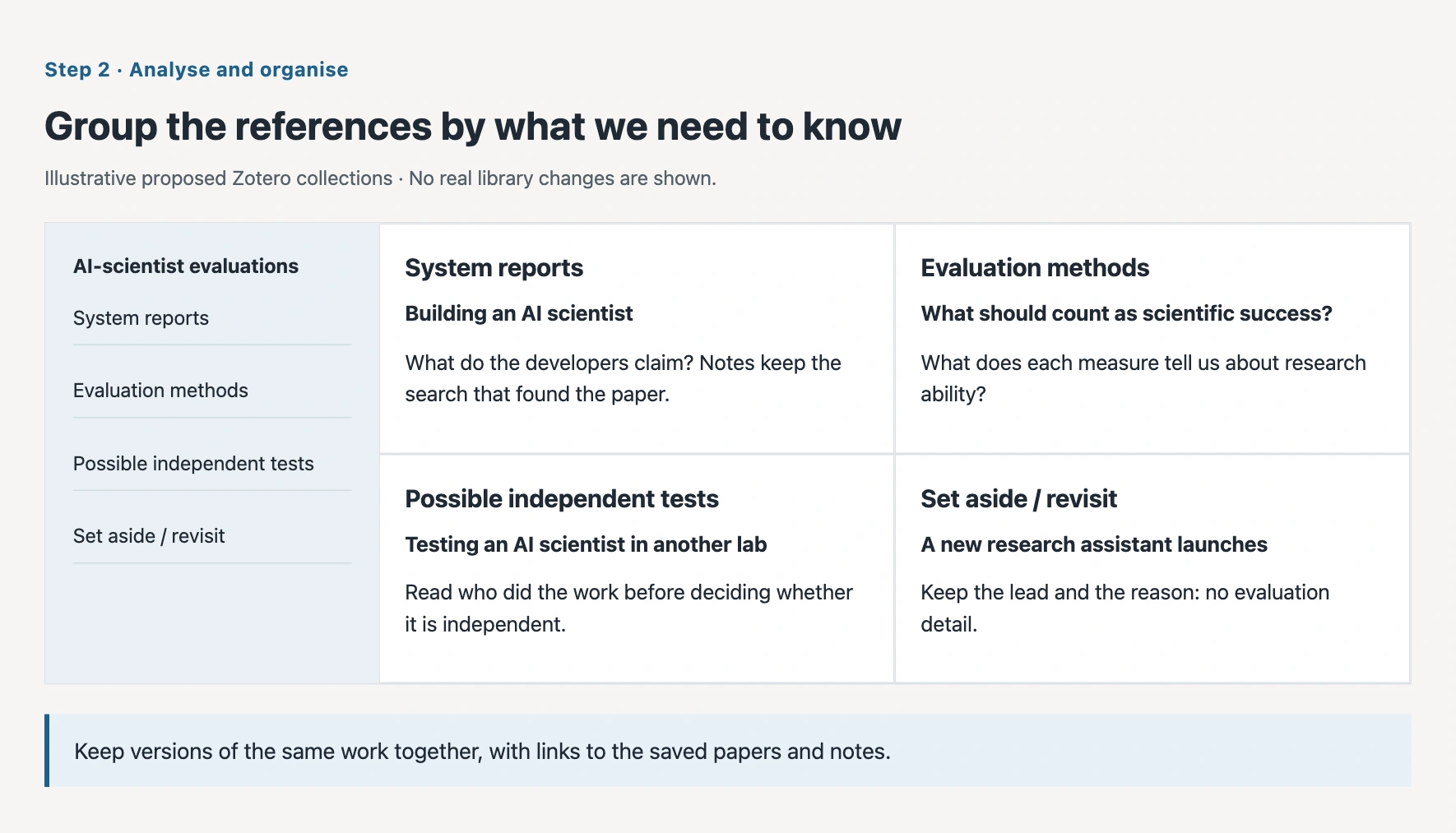
Compare the saved results with my Zotero library. Show me duplicates and different versions of the same paper. Organise the references into system reports, evaluation methods, and possible independent tests. Put papers whose relevance is unclear in a group to revisit. Keep a note explaining each choice and link the notes and PDFs to the references.
The Zotero simulation in the companion explainer lets you step through importing results, bringing duplicate records together, organising collections, and adding a note linked to a passage. Select a collection or paper to inspect what changes.
The agent first loads my public Zotero Wrangler skill and reads its instructions for working with references, notes, tags, and collections. It then uses those instructions to organise the library around your question. You supply what you want to achieve; the skill tells the agent how to do the Zotero work. You can ask it to work with papers already in your library as well as the new results.
Grouping also makes it easier to decide what to set aside. An announcement may help us find the system's paper but contain too little detail for comparing evaluations. A paper about a writing assistant may use the word 'scientist' without examining a system that carries out research. We can set these aside with a reason and return to them if the question changes. For a possible independent test, we still need to read who did the work and how; the title alone does not settle that.
Step 3 — Extract what answers the question
Once we have selected the papers to read, we need to decide what to take from each one. 'Summarise this paper' is too open for our question. We want to know who ran the evaluation, what the system was asked to do, what was measured, and whether the result was checked by people or experiments outside the system's own assessment.
We also need the passage behind each answer. If the agent says a test was independent, I want to see the part of the paper that supports that interpretation. If it cannot find that information, the table should say so. That gives us something specific to check in the paper.
Find the selected papers in my project folder and Zotero library. For each evaluation, extract who ran it, their relationship to the system's developers, the task, what was measured, and how the result was checked. Put each answer beside the supporting passage and its page or section. Keep the paper's words separate from your interpretation. Mark anything you cannot establish so I can check it.
My Academic PDF to Markdown skill helps the agent turn a PDF into readable text with its figures and tables. My Paper Reviewer skill gives it instructions for examining a paper's question, methods, and evidence. The research question still determines what we ask it to extract.
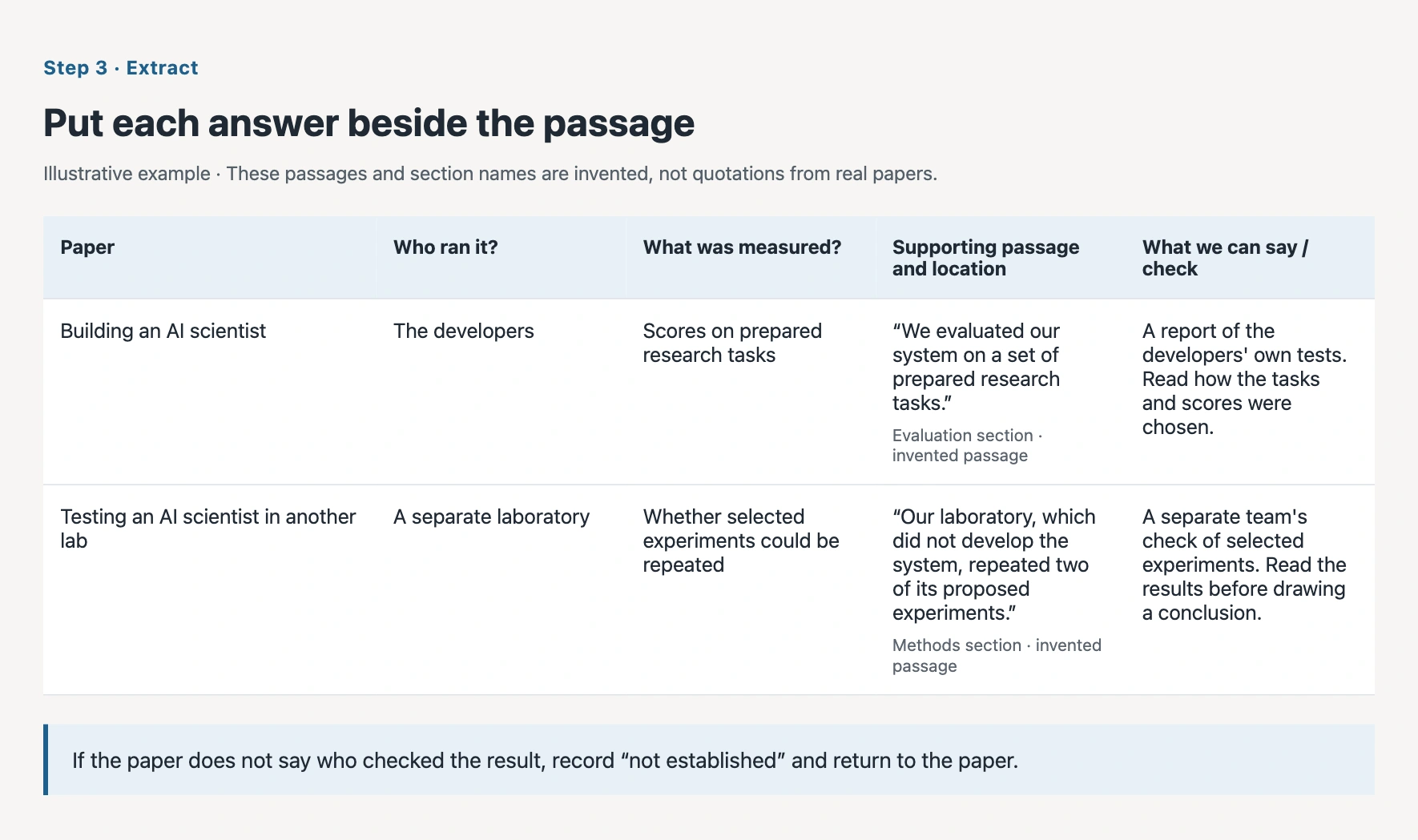
Reading across the table helps us ask better questions. A high score on a set of prepared questions and an experiment repeated by another team tell us different things about a system. We can compare those forms of evidence, identify information missing from the papers, and decide which sources deserve closer reading. We can also return to Step 1 to search for the missing checks.
Keep a record and a visual overview
The record should grow throughout the inquiry. It connects a search to the papers it found, a grouping decision to the question it serves, and an extracted answer to its supporting passage. My Research Reproducibility skill helps the agent keep that account as the work proceeds.
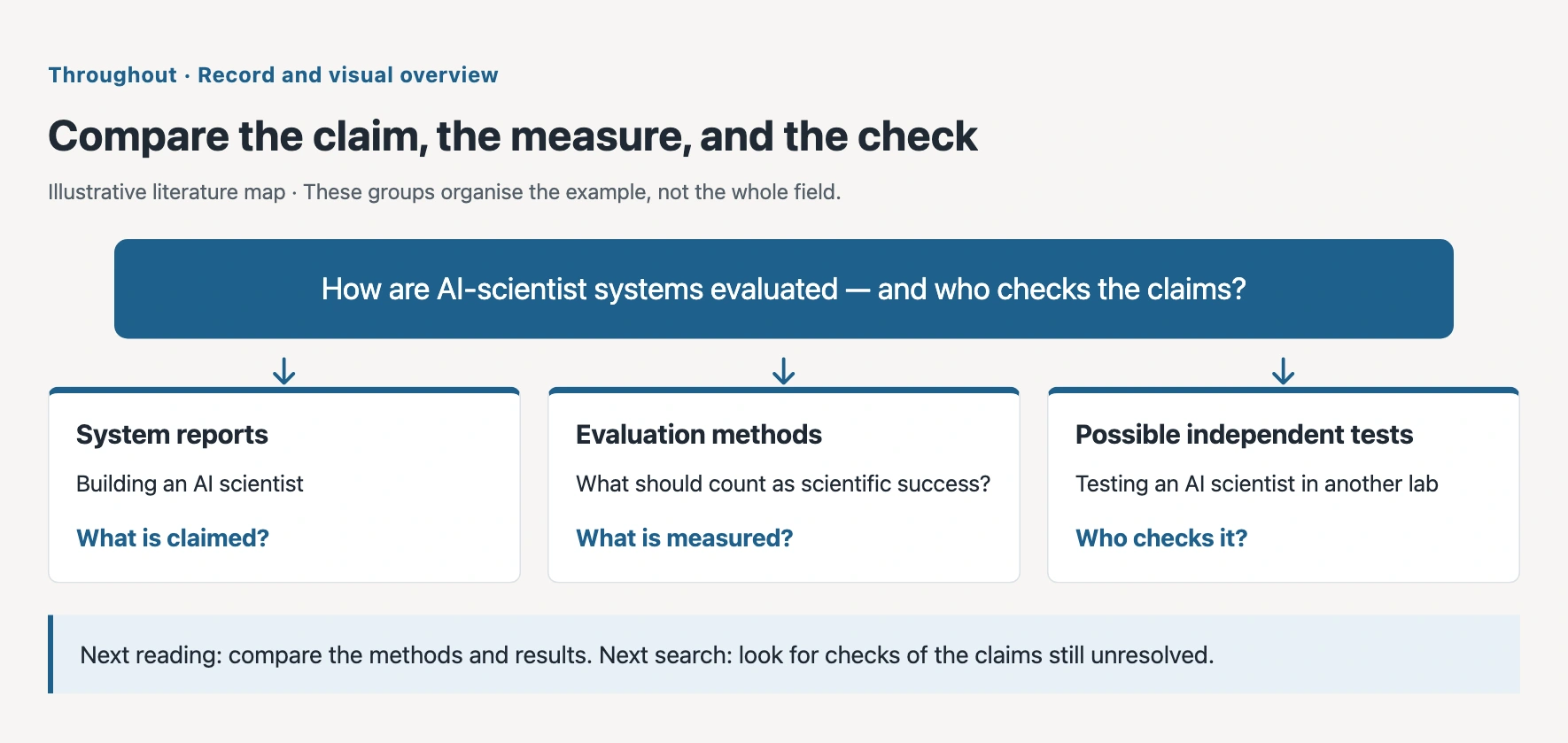
A table lets us compare individual papers. A chart by year can show when the papers in our collection appeared. A map of the literature can show how system reports, evaluation methods, and tests by other teams relate to our question. These views help us see what we have collected and where we need to look next.
Make a map of the literature we have kept. Connect the system reports to the evaluation methods and any tests by other teams. Link each part to the papers and our notes. Show the questions we still cannot answer, and suggest where we should search next. Keep the reasons for changes in the project record.
Some search results provide only abstracts, so the agent may need to find the full text. Your results are a sample of the literature, not everything that exists. Check the paper and its supporting passage before citing it.
Researchers and students in control
Deep research was a first attempt at using agents to improve retrieval and synthesis. Now researchers and students can direct the process themselves: find and save the sources, analyse and organise the references, then extract the information their question requires. The agent helps with the work and keeps it visible. You decide what the evidence means and where the inquiry goes next.
Sources and tools
- Semantic Scholar helps you find research papers and follow their references.
- Google Scholar helps you look for papers and related versions; Google can also lead to reports and discussion outside scholarly indexes.
- Elicit and Consensus offer specialised ways to explore research questions.
- Zotero keeps references, PDFs, and notes organised for reading and citation.
Explore the three steps in the interactive explainer, or see the earlier comparison of deep research tools.
Mark Completion
Track your progress even without step-by-step tasks.
Cite this page
Lukeš, Dominik (n.d.). Beyond Deep Research · SemanticMachines. SemanticMachines. https://semanticmachines.fyi/activities/beyond-deep-research